I get to the mid game and all of sudden, a move is not registering. I try re-moving the pieces, but it doesn’t help. I’m forced to quit the game because it’s impossible to continue.
I found no tech help phone #, or even a way to e-mail them. How can I contact ChessUp for help???
Try: info@bryghtlabs.com
I really like my Chessup 2  but I have the same issue. Today it happened three times out of five matches. I moved the opponents piece but the lights did not go off and I can’t move myself and must leave the game. I know that the team is working hard to fix issues and I can wait, no problem. I just want to make sure that this is a known issue for the team. (I am on latest firmware)
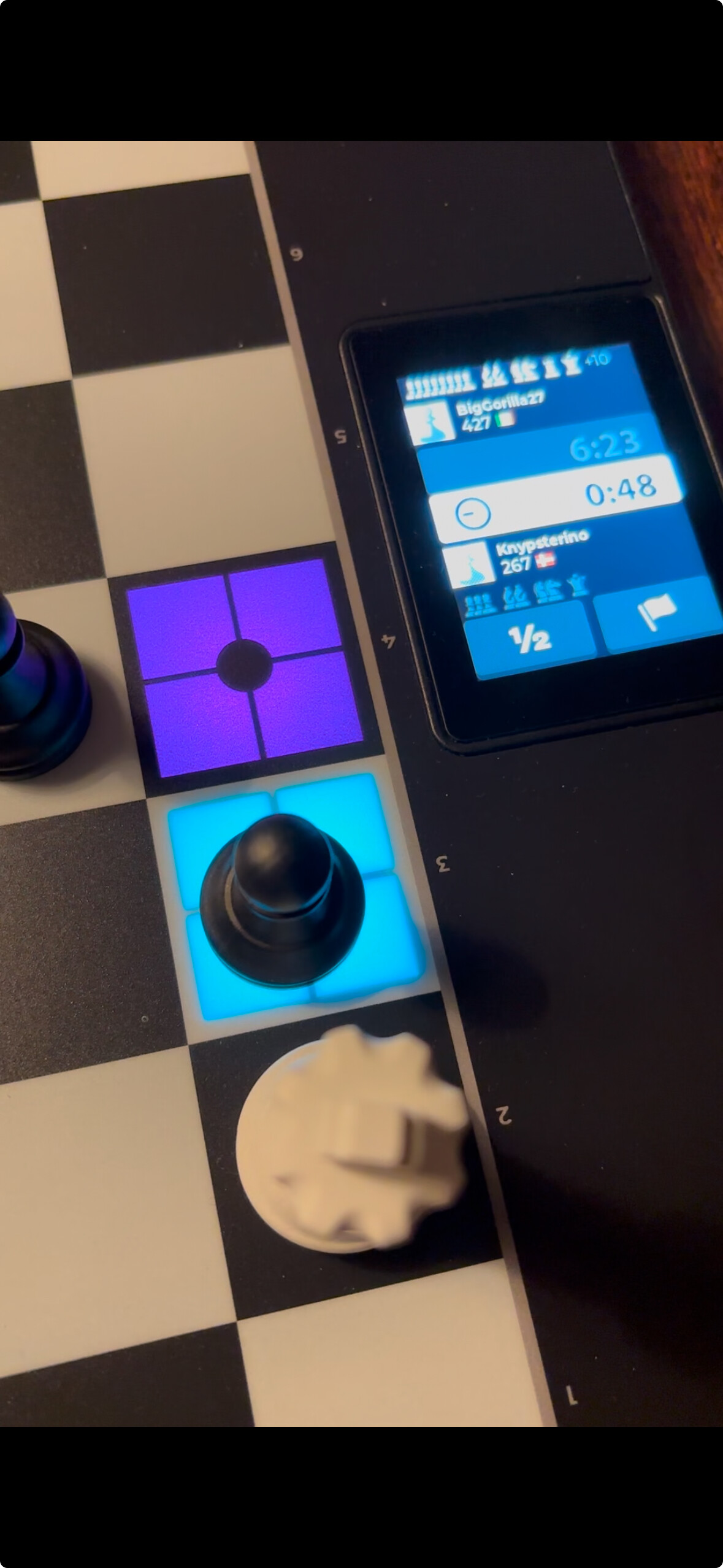
It also happened to me, but in my case it works after stepping back and redoing the move.
Also in one game my white king didn’t recognize some moves in the endgame and I had to press and slide it a bit harder until finally it worked, but it was a bit frustrating.
I’ve had same issue. I just keep trying the move over and over. Sometimes it works sometimes it doesn’t. Seems to happen in endgames most, have noticed it with white king more often than other pieces. Frustrating to lose on time due to these types of issues.
Jeff, when board doesn’t register move is there a workflow to do quickly to get it to work? Just reseting piece back and trying again doesn’t always work… But don’t know what else to do. Thanks
1 Like
I encountered the same issue yesterday while playing against a chess.com bot. I attempted to replay the last few moves several times before it resolved. This problem started after upgrading to version 1.5. Could this be a bug introduced in version 1.5?
I would like to echo that this just happened to me as well doing a chess dot com game. I couldn’t remember what the position was that I had to “reset” to and I couldn’t interpret the lights. At least using lichess with the phone you can see what it thinks the current state of the board is on the phone.
I am having this issue as well.
Playing against AI and the board doesn’t register a move and i have to start game over.
thank you,
Ben
Same issue - only since 1.5
Same issue - with 1.5
If it happens when moving a white king, then a new white king is needed.
However, for the move with the pawn (in the picture up thread) - that could be an issue with the black pawn or the specific h3 square. Please use the board editor to verify if the problem is in the square or the pawn?
The chat bubble on our page emails us. Our phone number is 913-358-6777 (US only for phone - M-F 9-5)
I am not sure how 1.5 would impact this - it was mainly an update with WiFi connection stuff. But I will ask the firmware team about it.
In the board editor all pieces and fields are working as expected. But during playing a game sometimes moves are not registered properly as mentioned above. In my cases sometimes it helps to redo the move several times until it got accepted, but most of the times it does not. During one game the field a6 was not accepting Pawns or Knights (didn’t try other) - we did continue with other moves, but later on when the best move would have been a6 it still denied to be the target field. The field g1 seems to be very sensitive as it starts to light up already when hand is close to the field, but not yet touching any piece, so eg. when someone is moving the g2 pawn, the g1 field lights up and the Knight need to be removed and set back again. Sometimes several removals are required, sometimes it helps to replace the Knight with the second one.
Ok thanks for the details. We may have edited the touch level and that could be impacting play.
We will roll that back immediately if so
1 Like
I’ve the same issues and can confirm the squares light up when my fingers are close to the piece but not touching so maybe it is about that sensitivity change


1 Like
I find changing around pieces helps sometimes as well and also repeating the move. Try tapping the piece 3 times on the square and saying ‘Zugzwang’ - might be wishful thinking but that fixes it sometimes as well, 3 times exactly 
2 Likes
I have an idea what’s happening, but if it’s not too much trouble, it would be great to confirm it in a video.
- Start a video, play until a piece misbehaves
- Pick up the misbehaving piece
- Say ‘Zugzwang’ three times aloud
- Replace the misbehaving piece
Yes exactly - works every time
Just need to somehow code that in…