Thanks - we are taking a look now.
We are having an intermittent issue with game seeking on certain accounts and it is now #1 bug to fix. So we will get it resolved soon and post an update when you should expect the fix to publish.
Thanks - we are taking a look now.
We are having an intermittent issue with game seeking on certain accounts and it is now #1 bug to fix. So we will get it resolved soon and post an update when you should expect the fix to publish.
Awesome thank you Jeff.
The last 5 days have been flawless for me Jeff. Just wanted to pass along. Not sure if something was done on back end or anything.
Thanks for reporting. Our software team is actively working on this now so yes some changes have been made. Still more work to come.
Jeff, just wanted to let you know I am happy with search the last few weeks. Sometimes it seems long still and I’ve restarted a few times but it could be on the chess.(com) end. Hasn’t slowed me down from using the board.
Good to hear - thanks for reporting back
In the last few weeks this problem started cropping up for me. Before that, the board always gave me a chess.com match within reasonable time (few seconds). Lately, there are times that the board gives me a match just fine, other times it just keeps stuck on the “starting soon” message screen.
I make sure that I have the wifi symbol + the green dot before starting a match. When this problem occurs, I cancel out of it after a few minutes. When I then retry, it never seems to give me a match and just repeatedly shows me the “starting soon” message. The only way out of this is to switch off the board and to try later. Normally, 15 minutes later or so, the board will give me a match just fine again. So, not completely broken, but annoying to be unable to connect when you want to play.
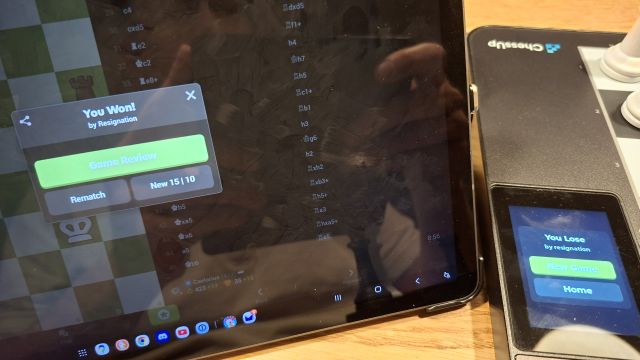
Then, today, I encountered the following scenario. This might help to shed some light on the problem:
See the attached pictures for what the board and the tablet showed. The chess.com match ID is Chess: Rostami_amir054 vs Caelarius - Chess.com
Thanks for the detailed report - that helps us troubleshoot.
Hi, I have also had this issue since I got the board 2 weeks ago and it makes it borderline unusable. I’ve tried waiting for the green pawn and it is not helping. Perhaps I’ve been added to the bad sportsmanship pool due to previous confusion. FWIW, I have never switched off the board mid seek, although the account I am using with the board is brand new.
I have a few suggestions as a fellow engineer (and would love to help for free if I got access to source):
I think I’m having a similar issue. I can get games instantly on chess.com on my iPad. But on the chessup2 50% of the time I just get a ‘connecting soon’ screen but nothing happens, or a game launches and then crashes and I get a message to continue on a different device.
Same…more often than not, I am stuck on the “starting soon” screen indefinitely
Dear @Jeff,
Hope you and your team are all doing fine, and many thanks for all the great work you are all doing, i love my ChessUp 2 board, and all the improvements you are doing  .
.
I’m actually trying to have an on-line Chesscom game with an opponent, and the board is into a“Starting Soon” loop since over 30 minutes. This behavior happens 90% of the time, and it also happens wanting to play against bots, not all the time for bots, but quite often.
Question : Would it be possible to include a “return to menu” button, on the waiting screen, instead of having to power off the board and having to restart over ?
With kind Regards,
Sam
@SamCodfish this is happening for me as well, except for me it is 100% of the time. I have not been able to start a single chess.com game through the board  - and when I try to do Chessup games, the connection keeps dropping between me and my opponent to where one of us ends up resigning. I love the hardware, so I hope these quirks will get worked out
Team is working on the recent connection issues right now - This is getting fixed ASAP.
@Jeff this seems to be rock solid now, thanks for the fast fix!
I am having the same problem described originally with games not happening after it’s been searching for several minutes. I was happy with the game I got to play yesterday which took a minute to load up but have had no luck once I got home today.
If I can send any information over let me know.
after about an hour off following a couple of the YouTube videos I reset my board and forced the same update to it. Then I re-logged into my chess account and waited to join a match that said unable to be found, backed out fully to the main screen and waited for the chess piece to pop up clicked on chess .com and have been able to get somewhat consistent matches. Only thing I need to do between matches is leave and wait for the chess piece to appear.
Have you tried to logout from the chesscom app before using the board? I noticed some improvement since i did that (android app). Maybe the app, as it’s connected all the time, makes some disturbance when you connect chesscom using the board…
I had a new issue today.
The game connection on board just randomly shut down, but the game was live via chess.com - this time the board didn’t even tell me to use another device, it just closed the connection and asked if I wanted to search again.